![Logo-1.png]](https://support.seamlesshr.com/hs-fs/hubfs/Logo-1.png?height=25&name=Logo-1.png)
The system now validates every row in an uploaded file before processing any records, blocking the entire upload if any errors are found and sending admins a detailed error email with actionable feedback.
Why this is important:
-
Protects data integrity
-
Eliminates the need for backend cleanup of bad promotion records
-
Gives admins the information they need to fix issues independently without escalating to support, thereby saving time.
Enhancements / Improvements - Promotion Bulk Upload Validation.
The Bulk Promotion Upload now validates every row in the uploaded CSV file against three rules before processing any records:
- Paygroup. The new paygroup specified in the file must exist in the system
- Paygrade. The new paygrade specified in the file must exist in the system
- Annual Salary. The new salary must be greater than the employee's current salary If any row fails validation, the entire upload is blocked. No records are processed, including rows that passed validation. The admin who performed the upload receives an error email showing a preview of the first 3 failed rows along with a "View All Errors" link that opens a dedicated page within the system showing the complete breakdown of all failed rows and their specific errors. The admin fixes the errors and re-uploads the file. Only a file where all rows pass validation will be processed successfully.
Why It Matters:
Before now, the Bulk Promotion Upload had no validation checks. The system would process whatever was in the uploaded file without verifying the data, meaning admins could upload records with paygroups or paygrades that didn't exist for the employee, or salaries lower than the employee's current salary, and everything would go through without question.
This led to employees being placed on wrong paygroups, paygrades, or salaries, and the only way to fix it was for the engineering team to manually write backend queries to identify and delete the bad records. This became a recurring task that took up time and created unnecessary risk.
It also meant admins had no way of knowing their uploads were incorrect until employees noticed something was wrong, leading to support escalations and frustration. With this update, invalid records are blocked before they can do any damage, and admins receive clear, actionable feedback showing exactly which rows failed and why. This protects the integrity of promotion data, reduces support escalations, and eliminates the need for backend cleanup, bringing the bulk upload flow in line with the validation already in place for direct promotions on the system.
- Available To: All Admins processing bulk promotion uploads
How It Works:
Step 1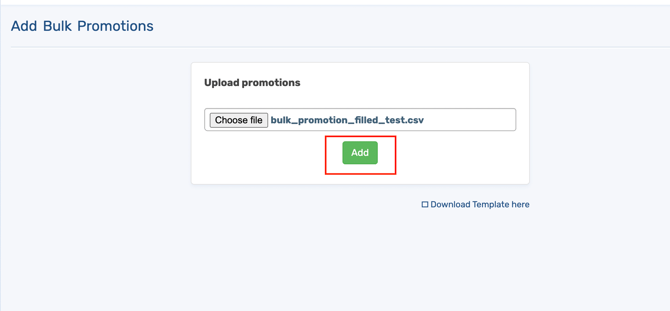 Step 2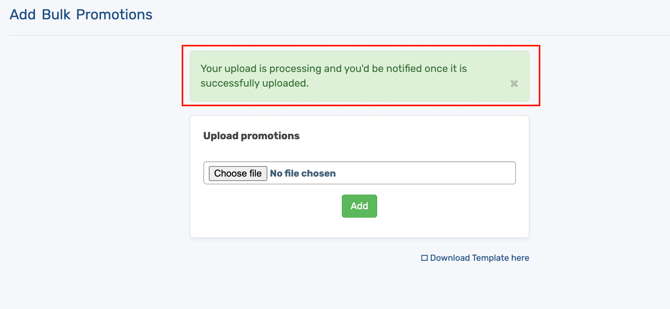
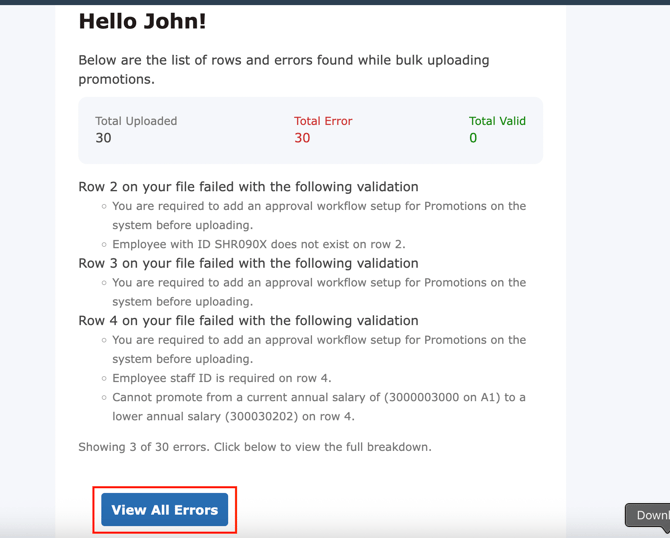
Important Notes:
- The entire upload is blocked if any row fails. There is no partial processing
- Only the admin who performed the upload receives the error email
- This update does not change the bulk promotion upload template or file format
- Effective dates remain unrestricted. Promotions can still be backdated or future-dated freely