![Logo-1.png]](https://support.seamlesshr.com/hs-fs/hubfs/Logo-1.png?height=25&name=Logo-1.png)
What We Built
When an employee initiates an action that goes through an approval workflow, there is a risk that the same person could also approve that action either directly or as part of a role assigned to an approval step.
This creates a single point of failure that can expose organizations to internal fraud, unauthorized approvals, and operational errors that go unchecked.
We've addressed this by introducing Maker Checker on the Approval Workflow module. At its core, Maker Checker ensures that the person who initiates an action cannot be the one to approve it.The feature operates on two levels.
At the organization level, admins can enable a global Maker Checker toggle that enforces this control across all approval workflows automatically — individual workflow admins cannot override this.
Where the global toggle is off, admins can still enable Maker Checker on individual workflows, giving organizations the flexibility to apply the control only where they need it.
When Maker Checker is active on a workflow and the requester appears as an approver at any step, the system automatically skips them and routes the approval to the next eligible approver.
If no independent approver is available, the action is blocked entirely to prevent any conflict of interest.
All skip and block events are logged in the audit trail.Maker Checker is turned off by default for all existing and new clients — organizations will need to actively enable it at either level.
Why We Built It
- Prevents self-approval — the person who initiates an action can never approve it, regardless of their role or admin privileges
- Two levels of control — organizations can enforce it globally across all workflows or selectively on individual workflows, depending on their governance needs
- Automatic conflict resolution — the system handles skip and block scenarios without manual intervention, keeping workflows moving where possible
- Full audit trail — every skip, block, and setting change is logged, giving organizations a clear record for compliance and accountability
- Opt-in by default — no disruption to existing workflows; organizations choose when and where to activate it
How It Works (Key Flows)
- Enabling globally — An admin navigates to the Approval Workflow module, turns on the global Maker Checker toggle, and confirms. From that point, Maker Checker is enforced on all existing and new approval workflows. Individual workflow maker checker settings can't be turned OFF while the global setting is ON.
- Enabling per workflow — When the global toggle is off, admins can enable or disable Maker Checker on individual workflows during creation or when editing an existing one.
- Requester is an approver on the workflow — When an action is submitted and the requester appears at an approval step, the system automatically skips them and notifies the next approver in the chain. If the requester is the only approver on the workflow, the action is blocked and the requester is notified that no independent approver is available.
- Requester is the last approver on the workflow — If all prior approvers have approved and the only remaining approver is the requester, the final step is automatically approved by the system on their behalf, and the action proceeds.
- Proxy submissions — If an admin or employee submits an action on behalf of someone else, the submitter is treated as the maker. Maker Checker applies to the submitter, not the employee the action was submitted for.
- Re-routing — An approver can re-route their approval step to another employee. If Maker Checker is on, the requester cannot be selected as the re-route target.
- Setting changes don't affect in-progress workflows — Any change to the Maker Checker setting at either level only applies to new workflow instances created after the change. Existing in-progress instances continue under the rules that were active when they were created.
Global Maker Checker turned ON for a respective subsidiary
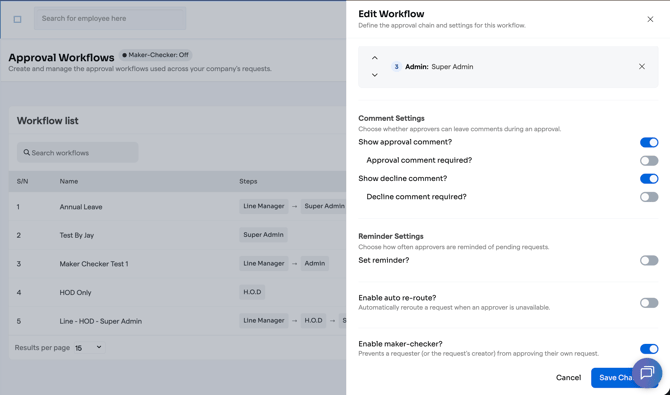
Individual approval workflow Maker Checker turned ON
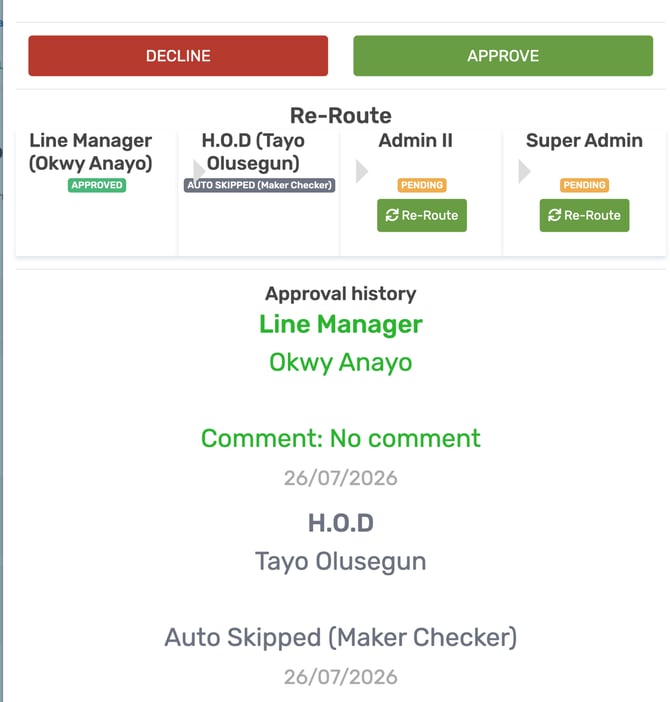
A Snapshot of an approval workflow showing an actor (HOD: Tayo Olusegun) who was also the requester that was skipped