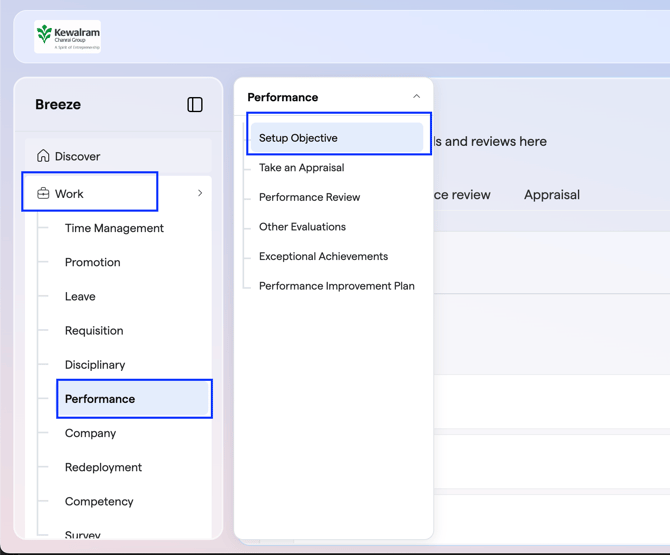
- On your Self-Service (ESS) page, click on "Work".
- Navigate to "Performance".
- Select Setup Objectives .
- Go to the Objective option
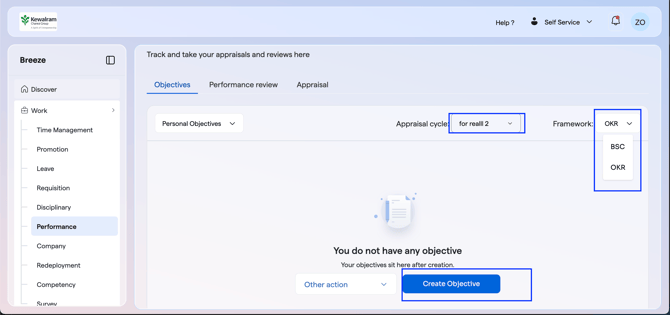
- Toggle between BSC or OKR, depending on what is applicable in your company, ensure you are in the right appraisal cycle and select 'Create Objective' again.
- Enter your Objective title and description (select a reviewer if your appraisal review ought to be done by someone other than your Line Manager), then click Next. Select

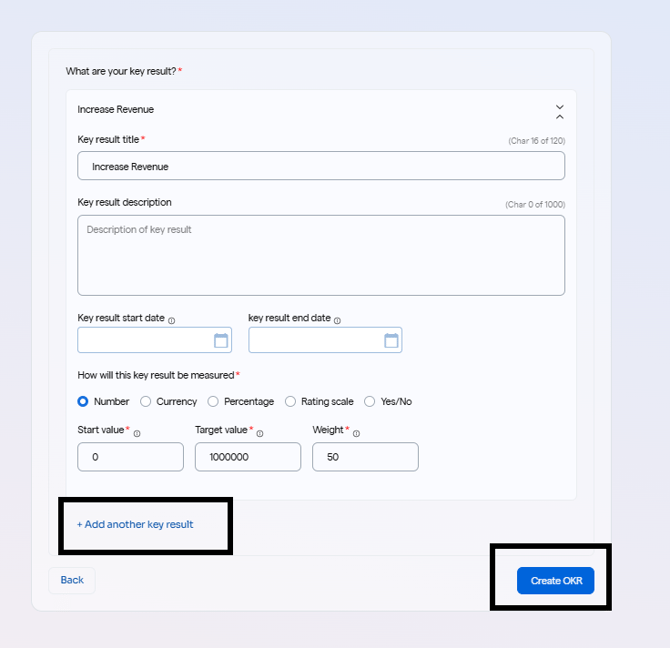
- Input the key result title, description, start date, end date, measure, start value, target value and weight under that objective and click on 'Add another key result' if there are more key results to be added under the same objective. Then click on 'Create OKR' to complete the process.
English
![Logo-1.png]](https://support.seamlesshr.com/hs-fs/hubfs/Logo-1.png?height=25&name=Logo-1.png)