![Logo-1.png]](https://support.seamlesshr.com/hs-fs/hubfs/Logo-1.png?height=25&name=Logo-1.png)
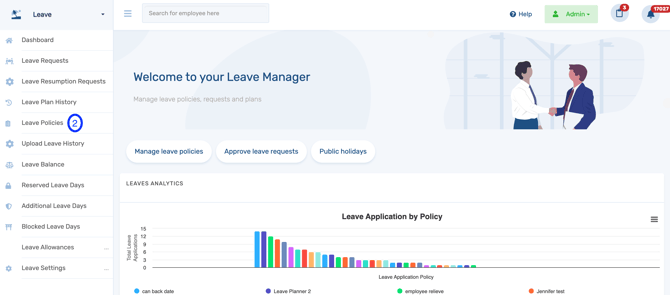
- Launch the Leave module.
- Click Leave Policies.
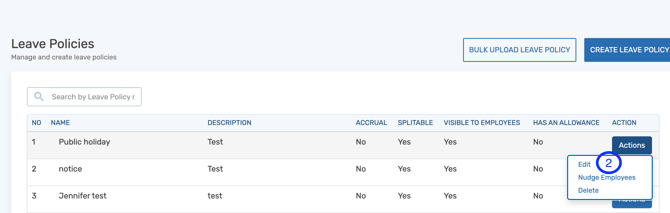
- Locate the leave policy you want to hide, click the Action button, and select Edit.
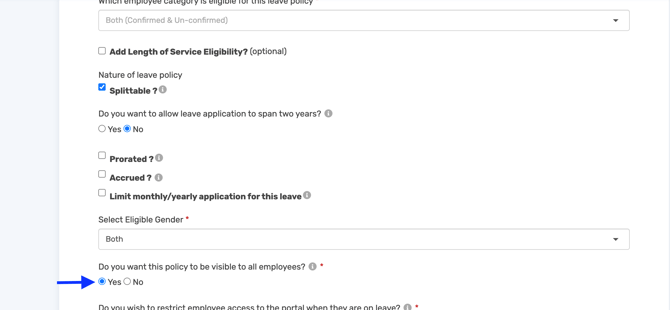
- Scroll down the Open Leave Policy page and select No to "Do you want this policy to be visible to all employees?"
Click on Next at the bottom of the screen and save the leave policy.
The leave policy will no longer be visible or available for request by employees. Only administrators will be able to view the leave policy.
If you need assistance at any point, feel free to contact the SeamlessTech Support team through any of the following channels: live chat, email at support@seamlesshr.com, WhatsApp on 0916 653 6169, or phone on 02013306080.