![Logo-1.png]](https://support.seamlesshr.com/hs-fs/hubfs/Logo-1.png?height=25&name=Logo-1.png)
Steps to Purchase Data
Step 1: Log in to the Breeze App
- Open the Breeze Mobile App.
- Log in using your registered credentials.
Step 2: Navigate to Benefits
- From the home screen, locate the bottom navigation menu.
- Tap Benefits to access the Benefits section.
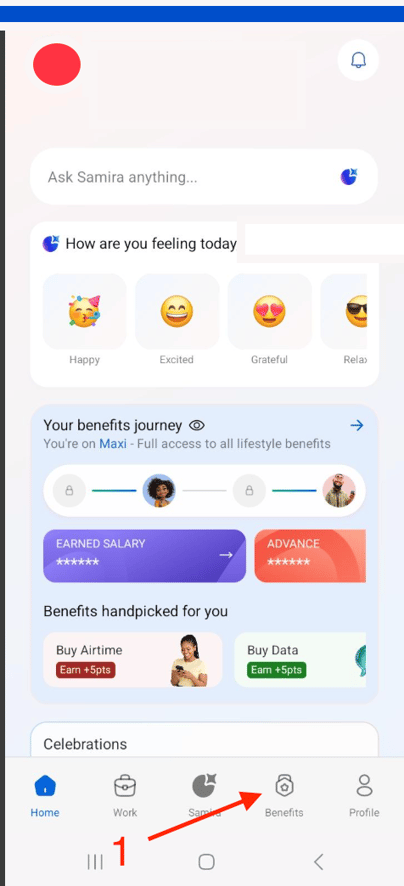
Step 3: Select Essential Benefits
- On the Benefits page, select the Essential Benefits tab.
- Browse the available benefit options.
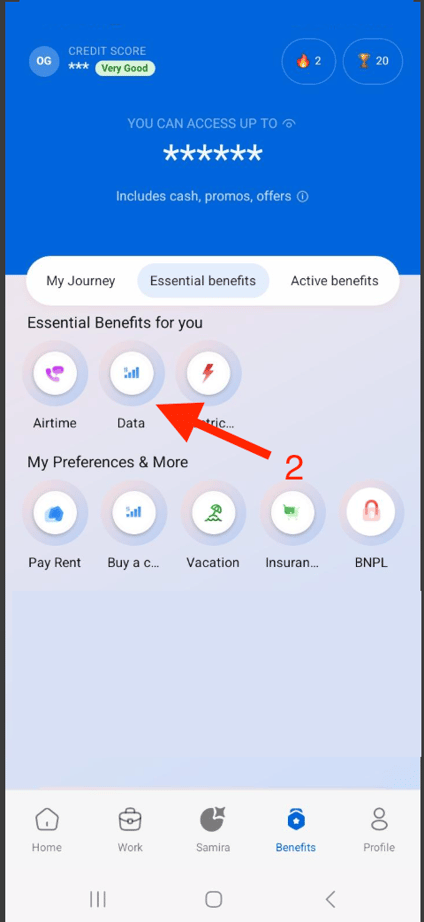
Step 4: Select Data
- Tap Data from the available Essential Benefits options.
Step 5: Complete Your Data Purchase
- Follow the on-screen instructions.
- Provide the required details, including the phone number, network provider and preferred data bundle, where prompted.
- Review the information entered and follow the prompts to complete your purchase.
Important Note : Ensure that the phone number, network provider and selected data bundle are correct before completing your transaction.