- Login to your self-service platform (ESS) and click on 'Work' on the left panel of your page.
- Select 'Performance'.
- Click on 'Exceptional Achievements'.
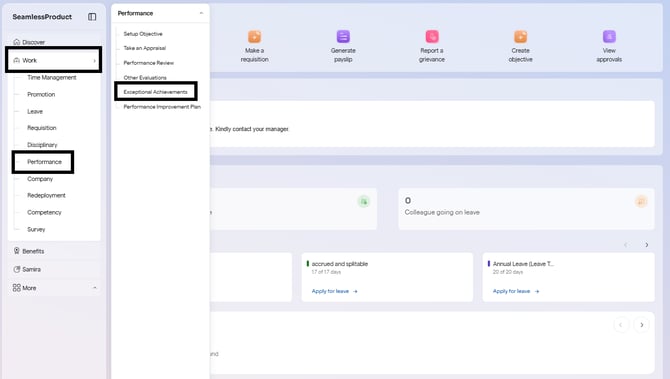
- You will be redirected to the Exceptional Achievements page.
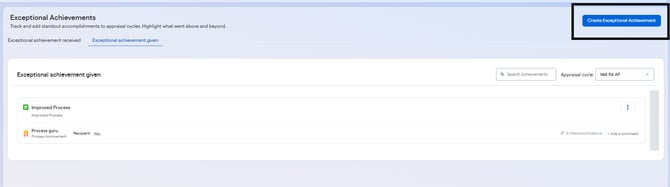
- Navigate to 'Exceptional Achievements Given'
- Click on 'Create Exceptional Achievement' in the blue box.
- A pop-up box will appear; fill in the exceptional achievement title and description; then select a category and a badge from the list of options available.
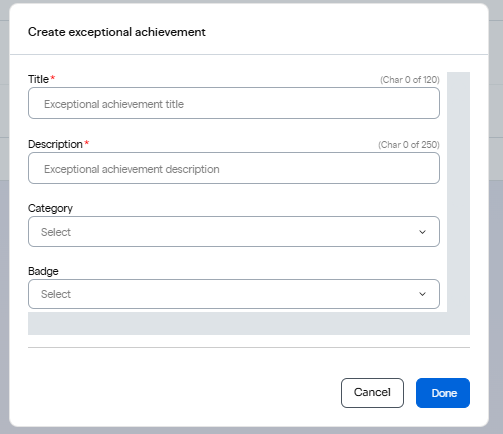
- Upload a document serving as an evidence to this achievement and confirm if the achievement is being created for yourself or not.
- Click on 'Done'.
English
![Logo-1.png]](https://support.seamlesshr.com/hs-fs/hubfs/Logo-1.png?height=25&name=Logo-1.png)