![Logo-1.png]](https://support.seamlesshr.com/hs-fs/hubfs/Logo-1.png?height=25&name=Logo-1.png)
Samira connects directly to your company’s HR system to give you fast, relevant, and accurate answers right inside the platform. You can use Samira in the following ways:
- Leave & Time Off: Check leave balances, policies, accruals, and manage leave requests.
- Employee Information: Find colleague contacts, department details, managers, and team structures.
- Personal Profile: Access employment, benefits, payroll, and personal information.
- Procurement & Requisitions: Create purchase requests, track orders, manage vendors, and check approvals/budgets.
Below is a guide on how to chat with Samira
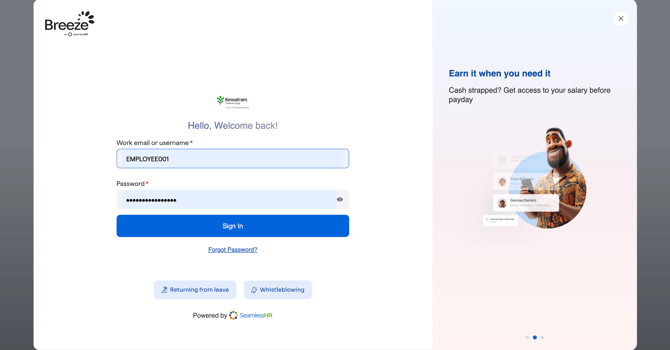
Step 1: Log in to your Employee Self-Service (ESS) account using your registered email address and password.
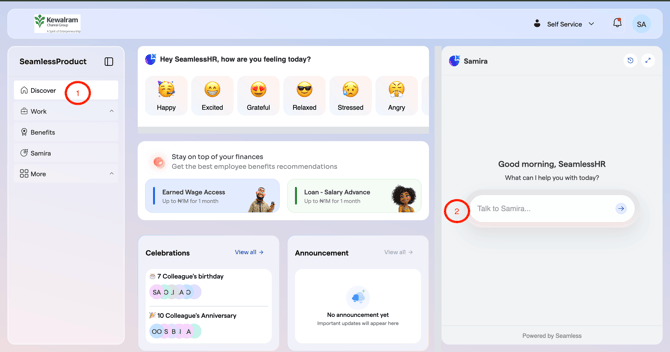
Step 2: Once logged in, on the Discover tab navigate to your right to chat with Samira
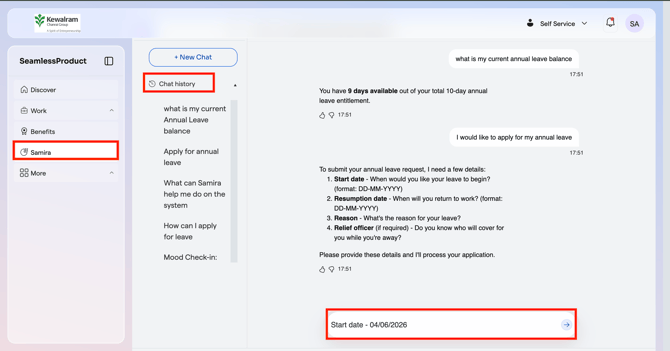
Step 3: You can also navigate to the Samira tab to get a broader overview of the feature. From there, you can view your chat history and start a new conversation with Samira, as shown below.