![Logo-1.png]](https://support.seamlesshr.com/hs-fs/hubfs/Logo-1.png?height=25&name=Logo-1.png)
In a multi-entity structure (a holding company and its subsidiaries) each entity manages its own employee ID auto-generation settings independently. While this works for organizations that want distinct ID sequences per subsidiary, it creates a significant challenge for those who want a single, unified employee ID sequence across the entire organization.
Using the same formula across entities was not possible, and rightly so since employee IDs must be unique across all entities, and duplicate IDs would be flagged as a conflict.
We've solved this with Global Employee ID Auto-Generation. Admins at the holding company level can now configure a single employee ID formula and apply it across all subsidiaries. Once enabled, the ID sequence runs continuously across every subsidiary (entity) meaning the next employee added, regardless of which subsidiary they are being onboarded into, always receives the next ID in the global sequence.When "Apply across all subsidiaries" is enabled, employee ID settings at the subsidiary level are locked to view-only.
Any changes to the formula must be made at the holding company level. If the setting is later turned off, subsidiary-level settings are unlocked and their previous settings is restored allowing admins to go in and configure their own settings independently.
Additionally, when employee ID auto-generation is turned on, the Employee ID column is removed entirely from the bulk upload template. Since the system assigns IDs automatically, admins no longer need to include or populate this column during bulk employee additions.
How it works (key flows):
Using the same formula across entities was not possible, and rightly so since employee IDs must be unique across all entities, and duplicate IDs would be flagged as a conflict.
We've solved this with Global Employee ID Auto-Generation. Admins at the holding company level can now configure a single employee ID formula and apply it across all subsidiaries. Once enabled, the ID sequence runs continuously across every subsidiary (entity) meaning the next employee added, regardless of which subsidiary they are being onboarded into, always receives the next ID in the global sequence.When "Apply across all subsidiaries" is enabled, employee ID settings at the subsidiary level are locked to view-only.
Any changes to the formula must be made at the holding company level. If the setting is later turned off, subsidiary-level settings are unlocked and their previous settings is restored allowing admins to go in and configure their own settings independently.
Additionally, when employee ID auto-generation is turned on, the Employee ID column is removed entirely from the bulk upload template. Since the system assigns IDs automatically, admins no longer need to include or populate this column during bulk employee additions.
How it works (key flows):
- Enabling globally — At the holding company level, an admin navigates to Employee ID settings, configures the desired formula/syntax, and selects "Apply across all subsidiaries." The sequence picks up from the last assigned ID across all entities no existing IDs are affected.
- Continuous sequence across entities — Once enabled, every new employee added across any holding company or any subsidiary receives the next ID in the global sequence, regardless of which entity they are being onboarded into.
- Subsidiary settings locked — The moment "Apply across all subsidiaries" is enabled, employee ID settings across all subsidiaries become view-only. Admins at the subsidiary level cannot make changes; all updates must be done from the holding company.
- Turning it off — If the holding company disables "Apply across all subsidiaries," subsidiary-level settings are unlocked and their previous settings is restored allowing admins to go in and configure their own Employee ID settings independently.
- Bulk upload — When auto-generation is enabled, the Employee ID column is removed entirely from the bulk upload template. The system assigns IDs to all employees being added automatically.
- One sequence, every entity — organizations with multi-subsidiary structures can maintain a single, consistent employee ID sequence across their entire organization without risk of conflicts or different ID formats.
- Centralized control — holding company admins have full ownership of the ID formula, with subsidiary settings locked to prevent accidental misconfigurations
- Seamless continuity — enabling the global setting picks up from the last assigned ID, so existing employee records are never disrupted
- Cleaner bulk uploads — removing the Employee ID column from bulk upload templates eliminates a step and reduces the chance of errors during mass onboarding
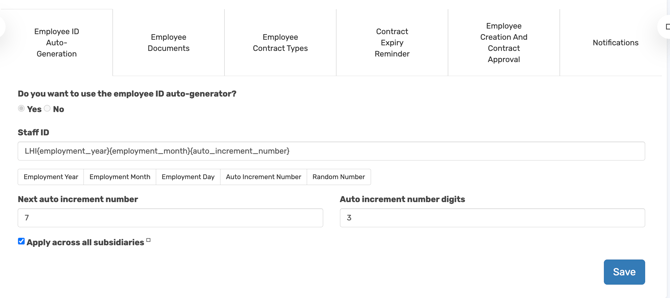
A screenshot showing the Global Employee ID auto-generation toggle turned on at a Holding Co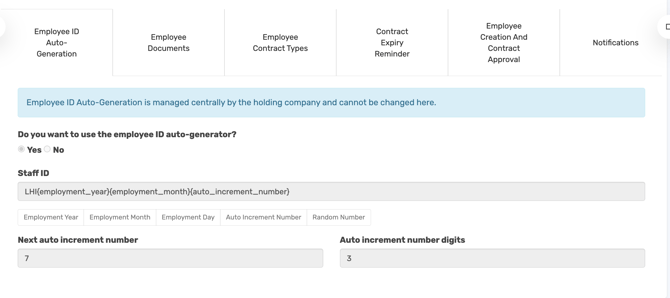
A screenshot showing subsidiary Employee ID settings locked to view-only
Note: When both SSO and form login are enabled, the system applies SSO rules for this feature. The "Send Login Details" column is not included in the bulk upload template, so bulk uploads do not trigger login invitations.